With Adobe Acrobat 9, you can convert any form into an interactive document that users can fill out and return electronically. Start with either a paper form you've scanned or an electronic form you've created in any application. It's simple, see how.
Create the PDF file.

![]()
Convert any electronic document to a PDF file, or scan a paper form directly into Acrobat (choose File > Create PDF > From Scanner).
Use the Form Wizard to create form fields

![]()
Choose Forms > Start Form Wizard. Follow the on-screen instructions. When you run the wizard, the document is analyzed and electronic form fields are automatically created.
Evaluate form fields.

![]()
Acrobat lists all form fields created in the Fields pane. Scroll through the document to see if any fields were missed or if any extra fields were created. To delete a field, select it in the Fields pane and press Delete.
Add and edit form fields.

![]()
Add text fields, check boxes, list boxes, combo boxes, radio buttons and action buttons to the PDF form. Select the type of form field from the "Add or Edit Fields" list in the Forms toolbar, and then click where you want the field to appear.
Save the form
![]()
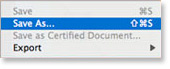
Be sure to save the form with all the fields you've added. Choose File > Save As to save the form with a different name, so that your original static document remains intact.
Learn more about forms with the following Adobe Acrobat 9 video tutorials:
Automating Form Field Creation
Editing Forms in Acrobat
Initiating a Data Collection Workflow Using Acrobat.com

Comments
Pre Pack Administration
Pre Pack Administration Finance 7, insolvency experts specialising in pre pack administration, insolvency, creditors voluntary liquidation, company administration & company voluntary arrangement. Unlike Insolvency Practitioners we represent Director interests not creditors.
Offshore Lex
Offshore Lex
Kitchens-Kitchens supplied
Kitchens-Kitchens supplied throughout the UK with a FREE kitchen design service. Kitchens from Pronorm and Wentworth.
Phoenix placement consultants at india
Phoenix placement consultants at india |Phoenix HRD Services in India |Phoenix HRD Services at India |Phoenix HRD Services in India |Phoenix HRD Services at Coimbatore |Phoenix HRD Recruitment Consultants at coimbatore |Phoenix HR Consultants |Phoenix HRD Recruitment Consultants |phoenix hrd marketing jobs |phoenix hrd medical jobs |phoenix hrd networking jobs |phoenix hrd Nursing jobs |phoenix hrd Packaging jobs |phoenix hrd Petrochemical Engineering jobs |phoenix hrd pharma jobs in india
Raid Recovery:-Data Recovery
Raid Recovery:-Data Recovery in the Netherlands Netherlands offers professional assistance in data loss. Data Recovery for all media - all brands - all operating systems.
San Diego Interior Design
Wrath of the Lich King Europe
f-1 visa
f-1 visa
Web Hosting Wrath of the Lich
Web Hosting
Wrath of the Lich King Europe
hard money lenders
hard money lenders
House Extensions Costs
House Extensions Costs - House Extension Quotations offers the cheapest prices online for building house extensions for any type of home extension in the UK. Get up to 3 quotes from local building contractors with this extension building quotes service.
Table lamps
Table lampstable lamps Table lamps in modern and traditional styles with a wide range of lamps for modern home lighting
Saveable forms
How is it that you can't create a form that allows end user to fill the form out and then save it so that it can be emailed.
dog collar
dog collar- Wide selection of fashion fabric and leather dog collars including personalized dog collars with matching leashes from the Dog Collar and Leash Store online. Cat collars and leashes, too
office cleaning
Franke sinks
Franke sinks Franke sinks Franke sinks are the big name kitchen sinks brand and Franke are at big discounts for UK delivery
Form Creation Wizard takes longer to do forms
I have been teaching Forms Creation with Acrobat since v.4. This has to be the worst update to what was a simplified method of designing forms in the past.
Unless you remain in the strict confines of a line rule based presentation, most fields are not recognized or properly labeled by the wizard. This means that you have to remove the fields and to them manually. Add to this a completely different Viewing Mode which you have to toggle between Edit and Preview Modes (not the case in v.8), no access to the Forms Tools unless you are in the Edit Mode and the fact that there is an apparent bug in the Tracking feature and this begins to explain the poorest implementation of this feature to date.
Regarding the Tracking feature we did tests using both Windows and Mac workflows. With the Tracking of forms, returning the form with v.8 Reader works but not in v.9, both on XP and OSX platforms. In Reader 9, here is a script missing as to identify which type of mail return the user is to choose. It appears in 8 but not in 9.
When will Adobe implement true UI and simplification in its Acrobat products? A suggestion would be to return to version 8's simplified method!
Easily create electronic forms
I am at a loss to see how I can get the data back electronically if I save this form.